

There are instances where scheduled posts fail to publish as intended, causing frustration and confusion. In this blog post, we will explore common reasons why WordPress scheduled posts may not publish and provide troubleshooting solutions to help you overcome this issue.
Why scheduled posts not publishing?
The WordPress missed scheduled post error typically occurs when something goes wrong with the cron job that publishes your content. Starting out with a few basic troubleshooting methods, may be enough to get your posts published reliably.
Check Your Scheduled Post Status: When a scheduled post fails to publish, the first step is to verify its status. Go to the “Posts” section in your WordPress dashboard and ensure the scheduled post is marked as “Scheduled.” If it is listed as “Missed Schedule” or “Pending,” proceed to the next troubleshooting steps.
Check Plugin Conflicts: Conflicts with other plugins can disrupt the proper execution of scheduled posts. Temporarily disable all plugins except the essential ones, then attempt to schedule and publish a test post. If the test post publishes successfully, reactivate each plugin one by one and test after each activation to identify the conflicting plugin. Once identified, contact the plugin developer for support or consider finding an alternative plugin.
Optimize Your WordPress Installation: A sluggish or overloaded WordPress installation can cause scheduled posts to fail. Take steps to optimize your website by minimizing the number of plugins, optimizing your database, and optimizing your website’s performance. This can enhance the reliability and efficiency of scheduled post publishing.
Verify Your Timezone Settings
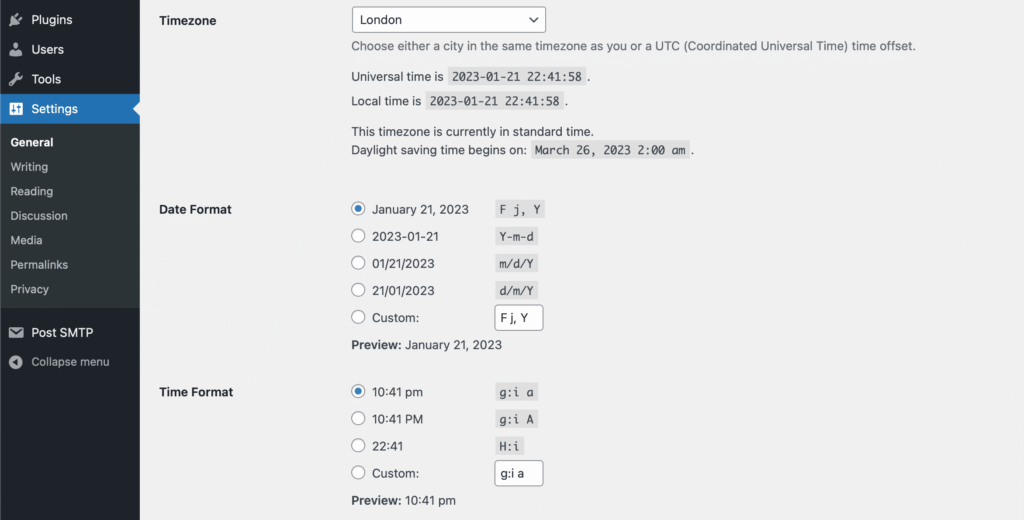
WordPress relies on accurate timezone settings to schedule posts correctly. Incorrect timezone configurations can result in posts publishing at the wrong time or not at all. To check your timezone settings, navigate to “Settings”
- Login to your WordPress admin account
- Go to Settings > General
- Select your timezone (Example: London)
- Then save changes.
In some cases, your server’s time may be out of sync with your WordPress timezone settings. If a discrepancy is identified, consider adjusting your server time to match your desired timezone.
Verify cron jobs are working
WordPress uses cron jobs to execute scheduled tasks, including publishing scheduled posts. Ensure that your WordPress installation has the necessary cron jobs enabled and functioning correctly. You can use the “Cron Tester” plugin to verify the status of your cron jobs or consult your hosting provider for guidance.
- Login to your FTP client.
- Open wp-config.php.
- Then… If the line is already present in the file, make sure it is set to false.
If not there, copy and place the following code, in the wp-config file above;
/* That’s all, stop editing! Happy blogging. */
define('DISABLE_WP_CRON', false);Conclusion
The scheduled post function in WordPress is a wonderful tool for content authors, but complications with post publishing may be annoying. You may discover and address common reasons of WordPress scheduled articles not publishing by following the troubleshooting procedures given in this blog post.
Remember to check the post status, time zone settings, server time, cron tasks, plugin conflicts, and optimise your WordPress installation. With these safeguards in place, you can retake control of your scheduled posts and guarantee they go live as planned.