
All the essential data, including posts, pages, users, and plugin settings, is stored in the database. Without it, your website won’t function at all and will give you and your visitors an error if it can’t access the database.
Why?
There are numerous causes for this error to appear, including, for example, a broken update, a server crash, incorrect configuration file editing, or exceeding server limits. This file is crucial since it contains all of the details about your website.
To fix the database connection, log in to your FTP and open the wp-config file.

Check that the database details are correct, like database name, user and password. You can find this information by logging into your cPanel account or PhpMyAdmin or contact your host, if they don’t use a control panel. If the hostname, username, password, or database name in the file are incorrect, replacing them should fix the error.
If all the information is correct, lets continue.
WordPress has a built in feature which can fix a corrupted database, and can be turned on by placing the following code in the wp-config.php file.
define( 'WP_ALLOW_REPAIR', true ); Repair Database
After saving the file and uploading it back to your server, you can run the new script by navigating to https://your-website.com/wp-admin/maint/repair.php in your browser. The resulting page will look like this:
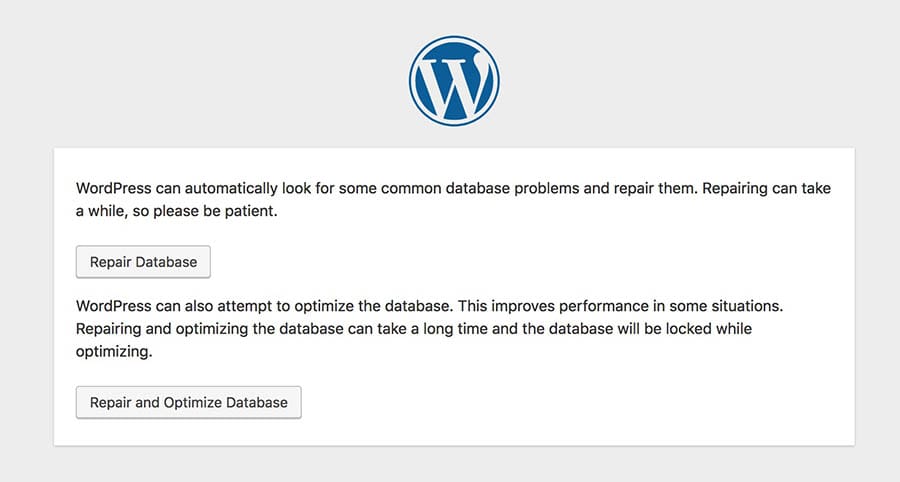
Click the ‘Repair Database’ button and let it work its magic. On a typical site it will take less than 30 seconds, of course the bigger the database the longer it will take, be patient.
Once complete, it will display a list of your database tables and hopefully have “Okay” next to them all. This should deal with your database connection error.
Finishing Up
Don’t forget to remove the line below from wp-config.php when you’re done.
define( 'WP_ALLOW_REPAIR', true );