

Working with databases is likely to be necessary if you are managing a website, particularly if you use systems like WordPress, Joomla, or any other CMS. Even if you’re not a tech savvy, cPanel makes database maintenance simple.
We’ll go over the fundamentals of cPanel database management in this tutorial, from building a database to performance-enhancing it.
1. Accessing MySQL Databases in cPanel
First, log in to your cPanel account. Look for the “Databases” section and click on “MySQL Databases”.
Here, you can:
Create new databases
Add users and assign permissions
Manage existing databases


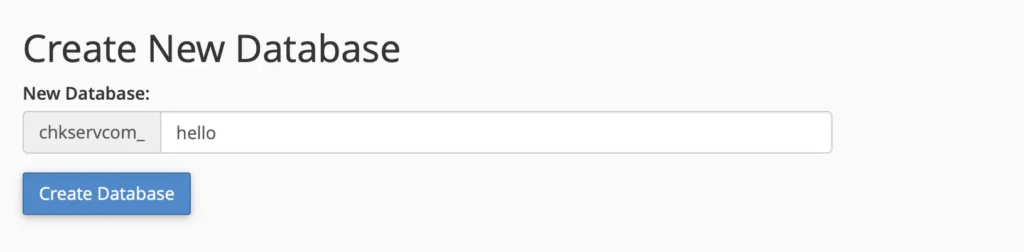
2. Creating a New Database
Under “Create New Database”, enter a name (e.g.,
mywebsite_hello).Click “Create Database”.
That’s it! Your database is now ready.
3. Adding a Database User
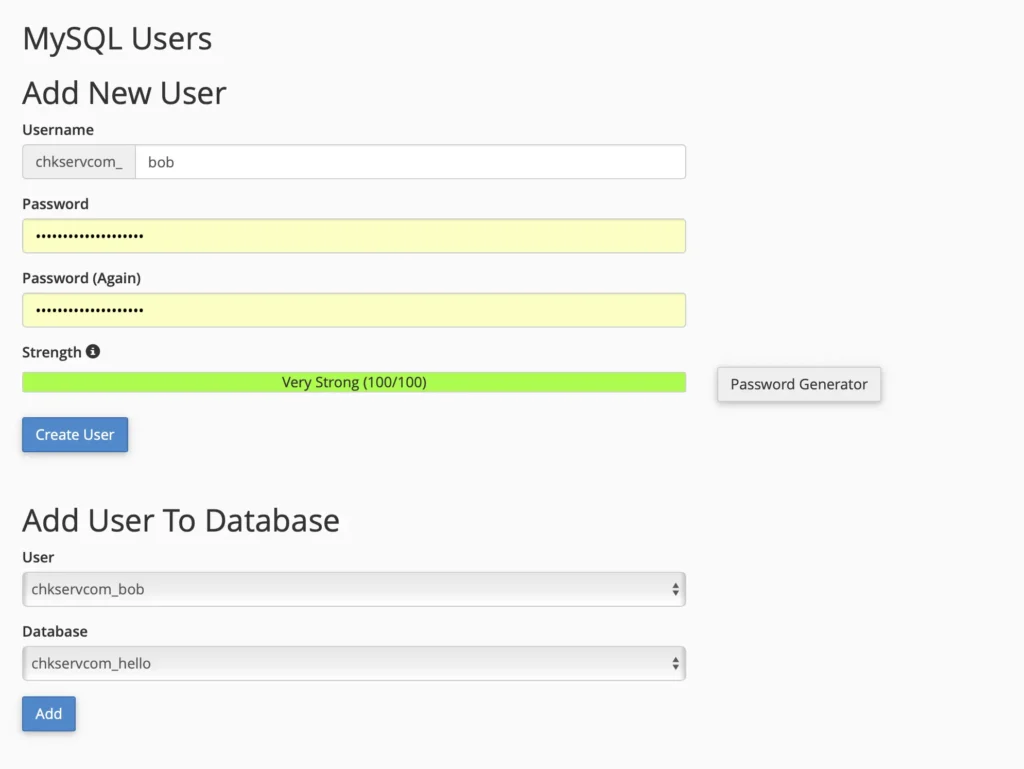
A database needs a user to access it. Here’s how to create one:
Scroll down to “MySQL Users”.
Enter a username and a strong password.
Click “Create User”.
Next, you’ll need to assign this user to the database.
4. Assigning Users & Permissions
Under “Add User to Database”, select the user and database you just created.
Click “Add”.
Check “All Privileges” (for full access) or select specific permissions.
Click “Make Changes”.
Now your user can interact with the database.
5. Managing Databases with phpMyAdmin
For advanced tasks (like importing/exporting data or running SQL queries), use phpMyAdmin:
Go back to the “Databases” section in cPanel.
Click “phpMyAdmin”.
Here, you can:
Import/Export Databases – Useful for backups or migrations.
Run SQL Queries – For manual database changes.
Optimize & Repair Tables – Helps speed up your database.
6. Deleting a Database
If you no longer need a database:
Go back to “MySQL Databases” in cPanel.
Under “Current Databases”, find the database and click “Delete”.
Be careful—this action is irreversible!
Final Tips for Better Database Management
✔ Regularly Optimize Tables – Reduces overhead and improves speed.
✔ Use Strong Passwords – Prevents unauthorized access.
✔ Monitor Database Size – Large databases can slow down your site.
✔ Backup Frequently – Avoid data loss in case of errors.